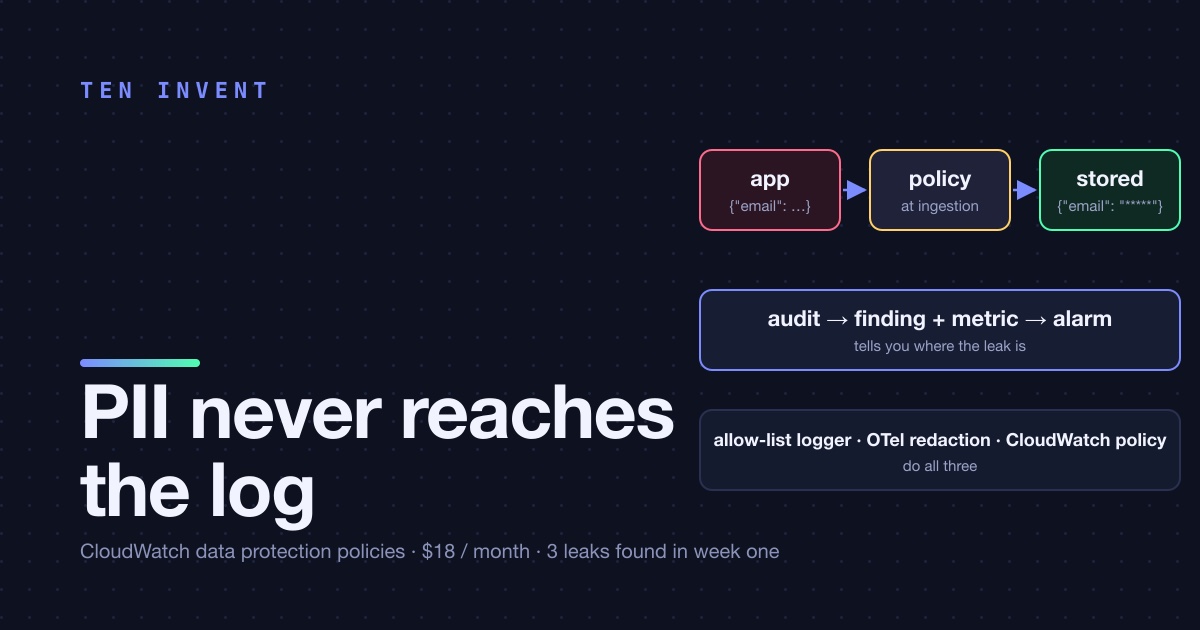
A support engineer asked for a debug log on one API route, "just for a week", to chase a bug in address validation. The log line was the whole request body. The route was the checkout. For nine days, every order's email, phone number, shipping address and the last four digits of the card were written to a CloudWatch log group with 30-day retention, readable by anyone with logs:GetLogEvents on the account, which was everyone.
Nobody did anything wrong with the data. We found it because a data protection policy we'd enabled a month earlier flagged it, at a rate of about 1,200 findings a day, and its alarm went off. This article is about that policy: what it is, what it costs, how it's configured, and why we still consider it a safety net rather than a fix.
What a data protection policy does
CloudWatch Logs can scan every event at ingestion against a set of data identifiers, AWS-managed (email addresses, phone numbers, credit card numbers, AWS secret keys, IBANs, national IDs for a long list of countries) or custom (a regex), and take two kinds of action. Audit counts matches, emits a metric, and optionally writes a finding to another log group, S3 or Firehose. De-identify masks the matched characters in the stored event, so what you see in Logs Insights is ***********.
The policy can be attached to a single log group or to the whole account. Masking is applied at ingestion and it's irreversible for anyone without the logs:Unmask permission; users who do have it can see the original with a flag on the query. The scan costs $0.12 per GB of log data scanned, on top of ingestion.
The policy we run
Account-level, so a new log group can't be created outside it. Managed in CDK like everything else:
// infra/lib/log-data-protection.ts
new logs.CfnAccountPolicy(this, 'LogDataProtection', {
  policyName: 'pii-guard',
  policyType: 'DATA_PROTECTION_POLICY',
  scope: 'ALL',
  policyDocument: JSON.stringify({
    Name: 'pii-guard',
    Version: '2021-06-01',
    Statement: [
      {
        Sid: 'audit',
        DataIdentifier: [
          'arn:aws:dataprotection::aws:data-identifier/EmailAddress',
          'arn:aws:dataprotection::aws:data-identifier/PhoneNumber-US',
          'arn:aws:dataprotection::aws:data-identifier/CreditCardNumber',
          'arn:aws:dataprotection::aws:data-identifier/AwsSecretKey',
          'arn:aws:dataprotection::aws:data-identifier/IpAddress',
        ],
        Operation: { Audit: { FindingsDestination: { CloudWatchLogs: { LogGroup: findingsGroup.logGroupName } } } },
      },
      {
        Sid: 'mask',
        DataIdentifier: [ /* same list */ ],
        Operation: { Deidentify: { MaskConfig: {} } },
      },
    ],
  }),
});

new cloudwatch.Alarm(this, 'PiiInLogs', {
  metric: new cloudwatch.Metric({ namespace: 'AWS/Logs', metricName: 'LogEventsWithFindings', statistic: 'Sum', period: Duration.minutes(5) }),
  threshold: 0,
  comparisonOperator: cloudwatch.ComparisonOperator.GREATER_THAN_THRESHOLD,
  evaluationPeriods: 1,
});
Two statements, because audit and de-identify are separate operations and you want both: masking protects the data, the audit finding tells you where the leak is so you can fix the code. The alarm on LogEventsWithFindings is the whole reason we caught the checkout log in nine days rather than never.
IpAddress is on the list deliberately and it's the one that generates noise. Our access logs legitimately contain client IPs, and masking them there would break the WAF investigation workflow. The account policy is the baseline; for the two log groups where IPs are the point, a log-group-level policy without IpAddress overrides it. Log-group policies and account policies both apply, and a term is masked if either matches, so the override has to be the absence of the identifier, not a permissive statement.
What the findings look like
The findings log group receives one JSON event per matching log event, with the log group, the stream, the identifiers matched and character offsets. Not the value. A Logs Insights query over it gives the leak inventory:
fields @timestamp, resourceArn, dataIdentifiers.0.name as identifier
| stats count(*) as events by resourceArn, identifier
| sort events desc
The day we looked, the top row was the checkout route's log group with EmailAddress and PhoneNumber-US, followed by a Lambda that logged a third-party webhook payload verbatim (EmailAddress), and a CodeBuild log that had echoed an environment variable containing an access key during a build that a colleague was debugging (AwsSecretKey). Three leaks, three different teams' habits, one query.
What it costs, and what it saved
At our volume, about 5 GB of logs a day, the scan is $18 a month. That's the same as the WAF and less than Route 53. For a platform that handles payments, it's the cheapest control on the bill.
What it doesn't do is make the underlying problem go away. The masked events still occupy storage and still cost ingestion. The support engineer's debug log was still a design mistake: logging a whole request body on a checkout route, at any masking level, is wrong. Data protection is the smoke detector, not the fireproofing. The fireproofing is in the application: a logger with an allow-list of fields, so that the default is nothing from the request reaches the log, and a code review rule that any new log.info(req.body) is rejected on sight.
If your logs don't go to CloudWatch
We've argued elsewhere that application logs shouldn't be owned by the cloud. If yours go through an OpenTelemetry Collector to Loki, the same control belongs in the collector, and it's arguably better there because it runs before the data leaves the host:
processors:
  redaction:
    allow_all_keys: true
    blocked_values:
      - '[A-Za-z0-9._%+-]+@[A-Za-z0-9.-]+\.[A-Za-z]{2,}'     # email
      - '\b(?:\d[ -]*?){13,16}\b'                             # card number
      - 'AKIA[0-9A-Z]{16}'                                    # AWS access key id
    summary: info
The redaction processor masks matching values in log attributes and reports a summary of how many it masked, which you can alert on. It doesn't have AWS's library of national ID formats, so for a regulated workload you'd maintain the list yourself. For the three classes of leak we actually see, emails, cards and credentials, three regexes cover it.
What we changed after the finding
- The checkout debug log was removed the same hour. The log group was set to 1-day retention until the masked events aged out, then back to 30.
- The application logger got an allow-list:
orderId,userId,route,status,durationMs. Anything else has to be added by name, in code review. - The webhook Lambda now logs the payload's shape (keys and types) and a hash, never the values.
- CodeBuild got
--no-echoon the environment step, and the access key that was echoed was rotated, because a log line is a copy. - The alarm now goes to the on-call channel with the Logs Insights query linked. Mean time from leak to fix on the two occasions since: under an hour.
Turn the policy on before you need it. It's one CloudFormation resource, eighteen dollars a month, and it will find something. Ours found three things in the first week. If you'd like help drawing the allow-list for your own logger, or setting the policy up across several accounts, talk to us.