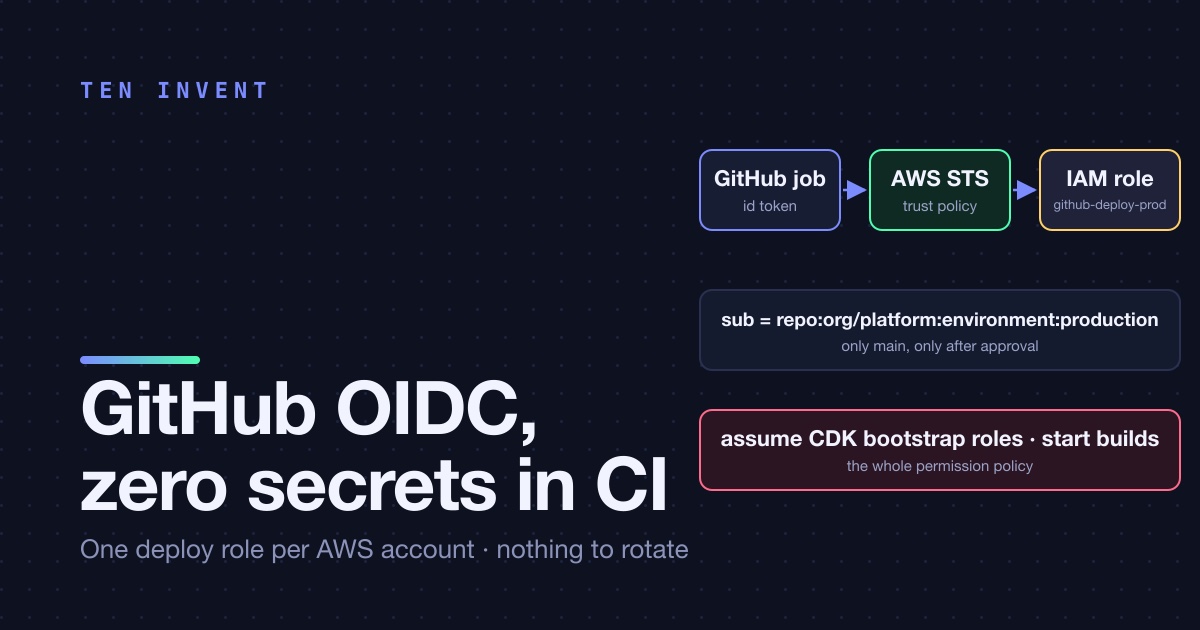
There is a long-lived AWS access key in your GitHub repository secrets. It was created by whoever set up the first pipeline, it has AdministratorAccess because that was the fastest way to make the deploy pass, and nobody has rotated it since. If that sentence doesn't describe your setup, you're in the minority, and you can skip to the trust policy section for the details. If it does, this article is how we replaced it with something that has no key to leak, in one afternoon, across three accounts.
What OIDC actually changes
GitHub Actions can mint a short-lived identity token for every workflow run. The token is signed by GitHub and carries claims about where it came from: the repository, the branch or tag, the environment, the workflow file, the actor. AWS IAM can be told to trust GitHub's token issuer, and an IAM role can be configured to accept only tokens whose claims match a condition. The workflow exchanges its token for temporary AWS credentials that live for an hour and are never stored anywhere.
Three consequences. There is no secret in GitHub, so there is nothing to leak or rotate. The permission to deploy is tied to where the code is coming from, not to who has the key, so a fork or a random branch can't deploy to production even if it runs the same workflow file. And every assumed session shows up in CloudTrail with the repository and branch in the session name, so "who deployed this?" has an answer.
One provider, three roles, three accounts
The OIDC provider is a per-account resource with GitHub's issuer URL and thumbprint. We create one in each of dev, staging and prod, from the same CDK codebase that creates everything else, and a deploy role next to it. The role's trust policy is where the environment separation lives:
// infra/lib/github-deploy-role.ts
const provider = new iam.OpenIdConnectProvider(this, 'GitHubOidc', {
  url: 'https://token.actions.githubusercontent.com',
  clientIds: ['sts.amazonaws.com'],
});

const allowedSubjects: Record<Env, string[]> = {
  dev:     ['repo:org/platform:pull_request', 'repo:org/platform:ref:refs/heads/*'],
  staging: ['repo:org/platform:ref:refs/heads/main'],
  prod:    ['repo:org/platform:environment:production'],
};

new iam.Role(this, 'GitHubDeployRole', {
  roleName: `github-deploy-${env}`,
  maxSessionDuration: Duration.hours(1),
  assumedBy: new iam.WebIdentityPrincipal(provider.openIdConnectProviderArn, {
    StringEquals: { 'token.actions.githubusercontent.com:aud': 'sts.amazonaws.com' },
    StringLike:   { 'token.actions.githubusercontent.com:sub': allowedSubjects[env] },
  }),
});
Read the allowedSubjects map as the policy it is. Any branch and any pull request can deploy to dev, which is what preview environments need. Only the main branch can deploy to staging. Only a job running in the GitHub environment named production can deploy to prod, and that environment has required reviewers configured in GitHub, so a production deploy is a main build that a human clicked approve on. The subject claim for an environment job is repo:org/platform:environment:production regardless of branch, so we combine it with a branch protection rule that only main can deploy to that environment.
Two details that cost us time. The aud condition must be StringEquals, not StringLike, or a linter will rightly complain that any audience is accepted. And the sub claim format changes with the trigger: ref:refs/heads/main for a push, pull_request for a PR, environment:name for an environment job. If a workflow gets AccessDenied on assume, print the token claims with actions/github-script before you touch IAM; nine times out of ten it's the subject format.
What the role can actually do
The trust policy says who may assume the role. The permission policy says what it can do once assumed, and this is where "least privilege for a deploy role" stops being a slogan. Our deploy runs cdk deploy, and CDK's model makes the answer clean: the deploy role doesn't need permission to create App Runner services or DynamoDB tables. It needs permission to hand a template to CloudFormation and to let CloudFormation's own execution role do the work.
role.addToPolicy(new iam.PolicyStatement({
  sid: 'AssumeCdkRoles',
  actions: ['sts:AssumeRole'],
  resources: [
    `arn:aws:iam::${account}:role/cdk-hnb659fds-deploy-role-${account}-${region}`,
    `arn:aws:iam::${account}:role/cdk-hnb659fds-file-publishing-role-${account}-${region}`,
    `arn:aws:iam::${account}:role/cdk-hnb659fds-image-publishing-role-${account}-${region}`,
    `arn:aws:iam::${account}:role/cdk-hnb659fds-lookup-role-${account}-${region}`,
  ],
}));
role.addToPolicy(new iam.PolicyStatement({
  sid: 'BuildImages',
  actions: ['codebuild:StartBuild', 'codebuild:BatchGetBuilds'],
  resources: [`arn:aws:codebuild:${region}:${account}:project/platform-*`],
}));
That's the whole policy. Four sts:AssumeRole statements into the roles CDK bootstrapped, plus permission to start our CodeBuild projects. The CloudFormation execution role that CDK created at bootstrap is the one with broad permissions, and it can only be used by CloudFormation, which can only be driven through a template that went through code review. The GitHub role itself can't call apprunner:DeleteService. It can't even list buckets. When we ran IAM Access Analyzer's unused-access report after a month, the deploy roles had zero unused permissions, which is a sentence we'd never been able to say about a CI credential before.
The image-publishing role deserves one caveat: if your images are built outside CodeBuild, on the GitHub runner itself, the deploy role needs ecr:GetAuthorizationToken and push permissions to the repositories. We moved image builds into CodeBuild partly to keep this off the GitHub role, and partly because a 2 vCPU runner building three Next.js images is slow.
The workflow
# .github/workflows/deploy-prod.yml
on:
  workflow_dispatch:
jobs:
  deploy:
    runs-on: ubuntu-latest
    environment: production          # required reviewers live here
    permissions:
      id-token: write                # this is what enables OIDC
      contents: read
    steps:
      - uses: actions/checkout@v4
      - uses: aws-actions/configure-aws-credentials@v4
        with:
          role-to-assume: arn:aws:iam::<prod-account-id>:role/github-deploy-prod
          role-session-name: gh-${{ github.run_id }}-${{ github.actor }}
          aws-region: us-east-1
      - run: ./scripts/build-images.sh --tag ${{ github.sha }}
      - run: npx cdk deploy platform-prod --require-approval never
No AWS_ACCESS_KEY_ID, no AWS_SECRET_ACCESS_KEY, no secrets block at all. The account ID in the role ARN is not sensitive; account IDs appear in every ARN in every log line. The role-session-name puts the run and the actor into CloudTrail, which we've used exactly once, to confirm that a deploy nobody remembered had been a scheduled workflow and not a person.
What happened to the old key
We deleted it. Not "disabled for a while in case something breaks"; we ran the new pipeline for a week in dev, one deploy in staging, one in prod, then deleted the IAM user. Something did break: a Terraform module in a different repository, maintained by someone else, that had copied the same key. It failed loudly, which is the point. It got its own role two days later.
The GitHub secret was deleted in the same change. Secrets in GitHub are write-only through the UI but they are readable by any workflow in the repository, including one added in a pull request from a collaborator, so a secret you don't need is a secret that eventually ends up in a log.
The checklist
- One OIDC provider per account, created by infrastructure code.
- One role per account, named for its environment, with a trust policy that names the repository and the ref or environment that may assume it. Wildcards on the branch only in dev.
audunderStringEquals.subunderStringLikeonly when you actually need a wildcard.- Permission policy: assume the CDK bootstrap roles, start the build projects, nothing else. If you're not on CDK, the equivalent is
cloudformation:*on your stacks plusiam:PassRolefor the execution role. - One-hour sessions. A deploy that needs longer has a different problem.
role-session-namewith the run ID and actor.- Delete the access key. Delete the IAM user. Delete the GitHub secret. Watch what breaks; that's your inventory of things that were sharing the key.
The whole change was under 150 lines of CDK and 20 lines of YAML per workflow. It removed the single most valuable secret in the company from the single most exposed place it could live. If your pipeline still has an access key in it, we can help you take it out.